Showing posts with label Hollywood. Show all posts

Saturday, 17 March 2018

Movie Collection Database

Movie Collection Database
I had the wild idea to use Hollywood Designer to create the software I need, hopefully with a similar interface to MyMovies, is this a good idea? I don't know but working on it should keep me out of trouble for a while.

I use MyMovies on my laptop to catalogue my DVD/Blu-Rays but would like to do this on my Amiga.

MyMovies 5.24

I am aware that other database software for the Amiga already exists, but creating my own would be a blast, if it works.

Blu-Manager created by Pal Ringkilen is one awesome piece of software, but I am biased as I was a tester on the software, for cataloguing Blu-Rays and it has a great interface.

Blu-Manager v0.9

I would like something in between the two, MyMovies has way too much information and, unfortunately, Blu Manager has too little.

I believe movie metadata can be acquired via IMDB and other sites so I assume it should be possible to input the title of the film or the bar code into my software and for the remaining data to be acquired automatically.

If anyone has any insight, suggestions, Hollywood Designer knowledge or thinks I am completely bonkers then please leave some comments below.

Michael Holmes

Sunday, 5 November 2017

Hollywood - Happy Birthday

Happy birthday Hollywood, from Airsoft Softwair - the hardest working men in code business, a great big thank you from all the developers out there that have used you to create some amazing software.

We at Blitterwolf would like to salute you for all the amazing work you have put in and are continuing to put in as is proven by the new Malibu 1.4 release.

I myself have used Hollywood for many years, helping in the production of my InTune program.

With the ability of Hollywood to run on many platforms and also the ability to compile software or use on many platforms.

With Hollywood 7: Eternity having its release this year as well 2017 is turning out to be a great year for Amiga developers everywhere.

From all us here at Blitterwolf, have a great birthday and carry on doing what you do best.

Michael Holmes

Monday, 14 August 2017

Amiga Laptop E.M.M.A. Part 5: New Look

I've been working on the look and feel of my emulation and wanted an OS4.x feel which meant, for me, the place to start was with the icons and the obvious choice was Mason Icons of which there are a huge selection of OS4.x icons from ADPro to YAD and a lot in between, however there are gaps that need filling so I downloaded Icons Reworked and cha05e90 Icons. Using the all the releases from all three gave me most of the icons I needed, from system icons to software icons.

Loads of Icons and Many More Besides

For an OS3.x machine to be able to display OS4.x icons properly an updated version of icon.library is needed or else the icons appear corrupt.


Changing the icons  and adding a more colourful wallpaper allowed me to take E.M.M.A. from...

Initial Workbench 3.9 Before Tinkering

to...

Updated Workbench 3.9 After Tinkering

As you can see I have made it a little more colourful. I have used the Fire Ice Planet wallpaper, amended the dock to incorporate OS4.x icons, removed some of the apps I will use least, installed NoWinED and dock icon as my text editor of choice and even replaced AWeb with iBrowse, browser of choice, mainly due to the fact that I'm not keen on AWeb and I couldn't get Netsurf working.

I have nine application available on the dock:

1. iBrowse
iBrowse 2.4

2. Personal Paint
Personal Paint 7.2.1

3. AmigaAmp
AmigaAmp 2.11

4. Amiga Shell
Amiga Shell

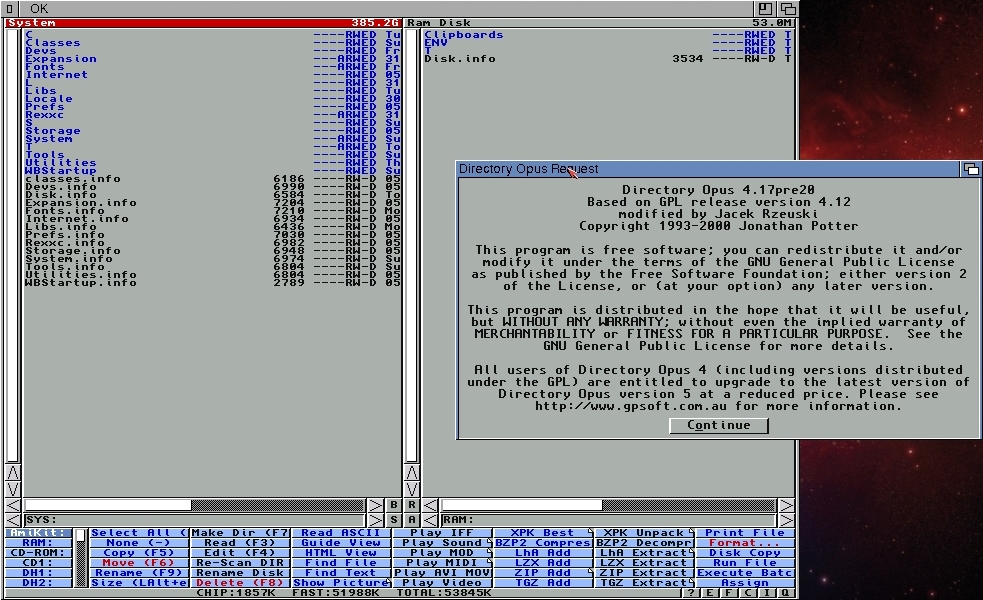
5. DOpus
DOpus 4.17 pre 20

6. LhA-RAM
LhA-RAM

7. ScreenMode Prefs
ScreenMode Preferences

8. Input Prefs
Input Preferences

9. NoWinED
NoWinED 0.83

I can now turn on my laptop, E.M.M.A., on and it boots straight into a full screen, 1366x768 Workbench, omitting having to see Windows entirely. Unfortunately the boot time is quite excessive, over 1 minute, even having disabled most of the Windows software that used to start on bootup.

I have added some up to date datatypes and libraries and would like to make it look a lot more like my Sam440ep but I am unable to install the DeJaVu font which I use as my default workbench font and I also use it in my InTune program.

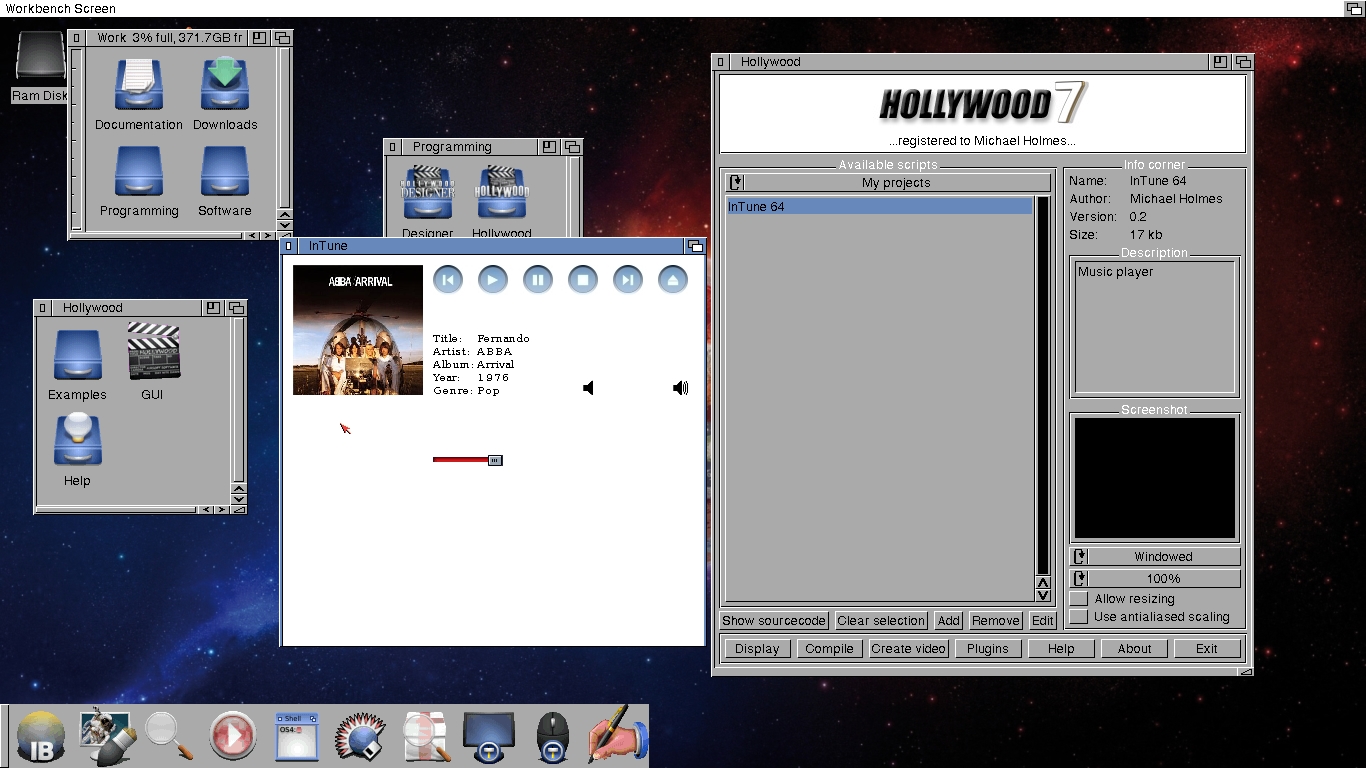
I can open Hollywood v7.0 and work on InTune, my music player, allowing me to get on and enjoy programming the Amiga way. I will hopefully, also, take a fresh look at my Star Trek database. 

Hollywood Running Just Fine

Showing My InTune Program Running

As you can see InTune is nowhere near complete. There's no playlist, not all MP3s load, seems to have some error when reading ID3 tags for artist on some MP3s.

I have to admit no matter how time consuming it is to do all I have done to get this far with E.M.M.A. I have thoroughly enjoyed every minute.

Michael Holmes

Saturday, 22 July 2017

Amiga Laptop E.M.M.A. Part 4

What I Realised
Looking back at E.M.M.A. I realised I had raised the bar way too high, running OS4.1 Classic on an emulated PPC machine, for the specification of this laptop and that running Amiga OS3.9 would be a better choice for my needs.

What I Wish
The hope of booting straight into Amiga OS3.9 and being able to work on my Hollywood projects, InTune and Star Trek Database, while on the go.

Installation "Sort Of"
I decided to forgo the installation and setup descriptive process, as this has been written about on numerous occasions and on various website. Epsilon in December of 2015 wrote about the process of installing Amiga Forever 2016 and Guru Meditation has a YouTube video showing How to install OS4.1.

Step 1...
Installation of Amiga Forever 7 completed and when run for the first time we are greeted with the very familiar Amiga Forever Launcher and the first thing I did was create a copy of the Workbench 3.x system and rename it E.M.M.A. and change the date to 2017.

Amiga Forever 7 Launcher

Renaming My Configuration to E.M.M.A.

First E.M.M.A. Emulation Session

I know I will eventually be going full screen but thought, for now, I'd resize the screen to give me as much Workbench real estate without it disappearing behind the PC taskbar at the bottom.

ScreenMode Prefs

Right I now have it figured, If I change screen mode to 1366x768, which is the same resolution as E.M.M.A. and then select fullscreen then Amiga Forever takes up the whole screen.

Resizing With ScreenMode Prefs to 1366x768

Selecting Fullscreen

E.M.M.A. in All Her Glory

I am now very excited at how this is going. There are still many things to do. Need to have it boot into this, full screen Amiga Workbench and of course the look and which software to install, etc.

I'd like to say a huge thank you to M. C. Battilana for allowing me the use of Amiga Forever 7 on my pride and joy.

Let's see how far I can take this project, I'd like it to be known I am not trying to compete with A.L.I.C.E.

Michael Holmes

Sunday, 19 March 2017

HOLLYWOOD 7: ETERNITY RELEASED

HOLLYWOOD 7: ETERNITY RELEASED

In the year of Hollywood's 15th anniversary, Airsoft Softwair, the hardest working men in code business, are back on your screen with Hollywood 7: Eternity. Hollywood 7.0 is a massive update with many new features and bug fixes. The most important new feature is full support for Unicode and native support for 64-bit CPUs on Windows, Mac OS, and Linux. This is especially useful on Linux because using 32-bit binaries on a 64-bit Linux is quite a hassle. On top of that, there are lots of other new features.

Here is a non-exhaustive list of new features in Hollywood 7.0:
  • Unicode is now fully supported!
  • Lots of new functions for dealing with Unicode text
  • Hollywood is now available in native 64-bit versions for Windows, Linux, Mac OS, and iOS
  • Mac OS and iOS backends have been completely rewritten, they are a lot faster now!
  • High resolution ("Retina") displays now fully supported on Windows, Mac OS, and iOS; Hollywood is ultra-crisp in 4K modes now
  • New hardware-accelerated full screen scale mode
  • Faster drawing on Windows and Mac OS
  • Lots of new features in the iOS backend
  • Support for conditional compiling at preprocessor level
  • Switch-Case statement supports fall through now
  • Text can now be laid out in justified lines
  • Lots of improvements in the IDE on Windows (e.g. direct help and syntax highlighting for functionality provided by plugins)
  • Multi-coloured vector paths are now supported
  • Live resizing on Windows and Mac OS
  • Time-stamped events
  • New example scripts
  • 70 new pages of PDF documentation, now 924 altogether!
  • Lots of other changes, optimizations and bug fixes

  • Hollywood 7.0 is the ultimate Multimedia experience and a must-have for all creative people. Hollywood is available on CD and as a download version. Both versions include Hollywood for all supported platforms (except the Android and iOS versions). It is no longer necessary to buy separate licenses for the different platforms. Buying Hollywood gives you a single-user license for all 15 platforms supported by Hollywood. If you already own Hollywood, you can buy a discounted upgrade version. People who bought Hollywood 6.1 in 2017 can request a free upgrade.

    Hollywood is the ultimate bridge between all the different AmigaOS compatible platforms and the other three modern desktop systems, Windows, Mac OS, and Linux! Additionally, Hollywood also supports the Android and iOS platforms. A truly unique feature is the ability to cross-compile native executables for many different platforms including: AmigaOS3, AmigaOS4, WarpOS, MorphOS, AROS (x86), Windows (x86, x64), Mac OS X (x86, x64, PPC), and Linux (x86, x64, PPC, arm). You don't even have to own these platforms in order to compile executables for them. It's enough to run Hollywood on one of the supported platforms and then compile programs for all the others! Only Hollywood makes it possible. If you want to learn more about Hollywood, please visit the
    official Hollywood portal which also has a forum for all questions concerning Hollywood.

    All this makes Hollywood The Cross-Platform Multimedia Application Layer. Join the Multimedia revolution and get your personal copy of Hollywood 7: Eternity now!

    This release was brought to you by Airsoft Softwair - the hardest working men in code business.

    Michael Holmes

    Tuesday, 20 September 2016

    Blitterwolf Issue 15

    Blitterwolf Issue 15
    One more back issue and one issue closer to the first Blitterwolf Mag in 2 years.

    We still have a few issues to publish before the all new issue 21.

    Page 1

    Page 2