Showing posts with label Amiga Forever. Show all posts

Saturday, 22 July 2017

Amiga Laptop E.M.M.A. Part 4

What I Realised
Looking back at E.M.M.A. I realised I had raised the bar way too high, running OS4.1 Classic on an emulated PPC machine, for the specification of this laptop and that running Amiga OS3.9 would be a better choice for my needs.

What I Wish
The hope of booting straight into Amiga OS3.9 and being able to work on my Hollywood projects, InTune and Star Trek Database, while on the go.

Installation "Sort Of"
I decided to forgo the installation and setup descriptive process, as this has been written about on numerous occasions and on various website. Epsilon in December of 2015 wrote about the process of installing Amiga Forever 2016 and Guru Meditation has a YouTube video showing How to install OS4.1.

Step 1...
Installation of Amiga Forever 7 completed and when run for the first time we are greeted with the very familiar Amiga Forever Launcher and the first thing I did was create a copy of the Workbench 3.x system and rename it E.M.M.A. and change the date to 2017.

Amiga Forever 7 Launcher

Renaming My Configuration to E.M.M.A.

First E.M.M.A. Emulation Session

I know I will eventually be going full screen but thought, for now, I'd resize the screen to give me as much Workbench real estate without it disappearing behind the PC taskbar at the bottom.

ScreenMode Prefs

Right I now have it figured, If I change screen mode to 1366x768, which is the same resolution as E.M.M.A. and then select fullscreen then Amiga Forever takes up the whole screen.

Resizing With ScreenMode Prefs to 1366x768

Selecting Fullscreen

E.M.M.A. in All Her Glory

I am now very excited at how this is going. There are still many things to do. Need to have it boot into this, full screen Amiga Workbench and of course the look and which software to install, etc.

I'd like to say a huge thank you to M. C. Battilana for allowing me the use of Amiga Forever 7 on my pride and joy.

Let's see how far I can take this project, I'd like it to be known I am not trying to compete with A.L.I.C.E.

Michael Holmes

Friday, 9 June 2017

AMIKIT X INSTALLATION

AMIKIT X INSTALLATION

This is just a short step by step guide on how easy it is to install AmiKit X on a laptop.

When we first start AmiKit X we are presented with the welcome screen shown below, let's just press "Next" and see where it takes us.


We are now asked for the folder where we wish to save AmiKit, I will just keep it as the default folder and select "Next".


It seems we are now ready to install, so let's go right ahead.


So far everything is really straightforward with no messing, let's hope this continues, so let's press "Install" ad see what's next.


After just 2 minutes we get the chance to finish the installation process. So press finish and het presto, we are done. We now have our AmiKit shortcut on our desktop.


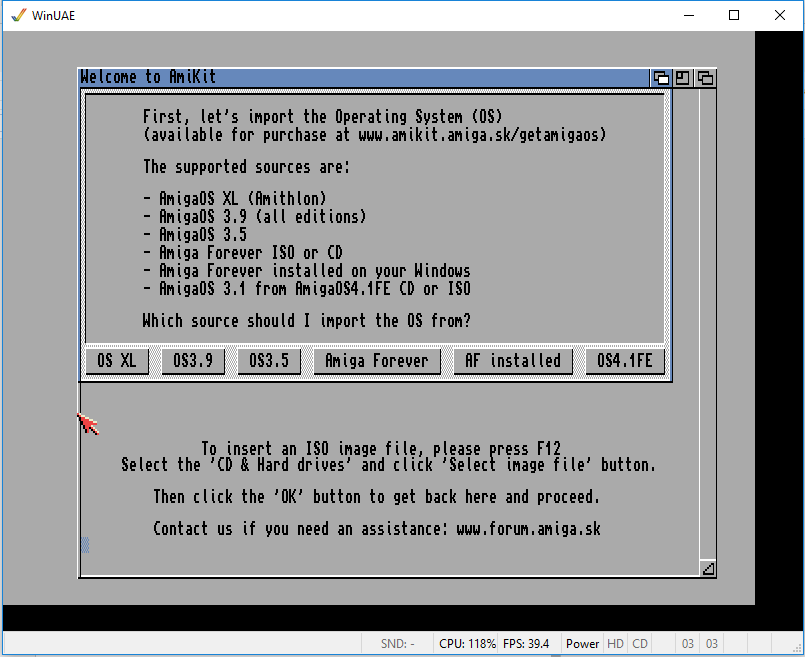
Double clicking the shortcut takes us to the launch window. Selecting "Launch" we are given our first glimpse on the Amiga Workbench displaying the AmigaOS install choices.


As I have a copy of Amiga Forever already installed so I'll just select "AF Installed" and take it from there and it proceeds to import system files, which takes a matter of seconds, then asks me to reboot.


Now I am taken to the very familiar Screenmode Prefs screen and I'll select a mode that is slightly lower than my laptops native resolution of 1366x768 so I'll select 1280x720.


Now apparently my AmiKit X installation is complete and I have to press "Enter" and get ready to be amazed.


Well I am amazed, after playing with it for a while I realise I am willing to go full screen with this so I just press F12 which opens up the WinUAE properties allowing me to select AmiKit-fullscreen.


And the process of having a fully functional AmigaOS laptop is complete.

In my next instalment I will be going to the next level.

Michael Holmes

Sunday, 13 November 2016

AMIGA LAPTOP E.M.M.A. PART 3

Amiga Laptop E.M.M.A. Part 3
Installing AmigaoS4.1
I don't really need to cover much about this as it has been documented many times under emulation and on native hardware so I will just comment on my experience setting up and the overall experience.

I will say I had a little problem when installing as the default window when installing was larger than my 14" Windows laptop resolution could cope with, I managed to get round this by installing Amiga Forever and then Installing AmigaOS4.1 on a laptop with a larger screen resolution.

Once OS4.1 was installed on my 15.6" laptop I could set the Workbench screenmode to one which would fit the 14" laptop which is 1366 x 768. Once the screenmode setting and the virtual HD and config file are saved they can then be copied to the new laptop and then when Amiga Forever is run and this config file and virtual HD are loaded then E.M.M.A. is up and running.

I am now able to run E.M.M.A. at virtually full screen, I have to take into account the taskbar of a Windows machine and also the titlebar on the Amiga Forever window and I get to run it at 1366 x 720 which is pretty good going.

I have a few issues that need to be addressed but as this is more time spent using Amiga Forever than I have ever done before I'm sure I'll get these sorted. There are also issues with the hardware choice but it's too late for that, for a start a 1.6ghz laptop is slow but usable, faster would be better.

I need to look into adding the PCs drives or directories, I know this is possible but it will take some investigation..

If there is one thing I have learnt from this process is that Amiga Forever is a very powerful piece of software that enables non Amiga PPC owning people to be able to get the experience without forking out for new hardware.

I can honestly say that without Amiga Forever I would not have been able to set up E.M.M.A.

Pricing
To get E.M.M.A. running it has cost me approx. £250.00, that includes the hardware, Amiga Forever and AmigaOS4.1 Classic, If I had spent another £100.00 on the laptop, this would have given me a 2.48ghz processor and therefore a smoother experience that is still only £350.00 which to me seems a very reasonable price to pay for an Amiga laptop.

Here's a simple question, would you buy E.M.M.A. for £350.00 if sold as a complete package?

I have enjoyed getting it to the stage I'm at and will continue to refine E.M.M.A. possibly try on a faster processor, use the laptops HD, possible larger screen modes and it would be nice to be able to boot straight into OS4.1 and not need to deal with Windows.

The End, or is it...

Michael Holmes

Thursday, 10 November 2016

AMIGA LAPTOP E.M.M.A. PART 2

Amiga Laptop E.M.M.A. Part 2
Amiga Forever
When people think of emulation they think annoying, time consuming, messing around with many configurations and downright frustration, none of this will be seen here thanks to Amiga Forever as this is the ideal software when it comes to emulation for Amigas on PCs.

It was probably going back to 2009 when I first got introduced to Amiga Forever and was hooked straight away, I have always had an keen interest in emulation of many systems from getting a small handheld Android machine and having it run C64 emulation all the way up to Amigas on PCs.

So onwards it is, I am using the latest incarnation which is Amiga Forever 2016 version, the installation is flawless and doesn't take too long. Once installed and run you are presented with the window shown below

Amiga Forever 2016 Player Window

In the systems tab shown above you will see listed all the Amiga models all the way from 1985 and the Amiga 1000 up to more modern versions from 2002 with Workbench 3.x. Options also include variants such as AmigaSYS, AmiKit and AROS.

For my purposes I will need a version of the Amiga 4000 so I right clicked on Amiga 4000 and I copied and renamed to AmigaOS 4.1fe.

At this point I remembered that my copy of AmigaOS4.1 for Classics would need to be registered on the Hyperion website, thankfully to take out more complication a downloadable version of the disk ISO is available here.

From this point on to carry on the configuration of Amiga Forever all I needed was the AmigaOS4.1 Emulation book, fully illustrated with brilliant step by step instructions.

So now I have a nice 14" laptop with a copy of Amiga Forever 2016 installed, I wonder what to do next...

To be continued...

Michael Holmes

Monday, 7 November 2016

AMIGA LAPTOP E.M.M.A.

E.M.M.A. (Emulated Machine, My Amiga) Part 1
I had initially thought of putting my Sam440ep board into a laptop case and having a native Amiga laptop, I posted on amigaworld.net on the 10th October 2016 looking for advice on weather anyone thought it possible.

It is now nearly one month on and I have decided that the idea was beyond my capabilities if at all possible.

I already had in my possession a copy of AmigaOS4.1fe Classic and a copy of Amiga Forever 2016 and also recently purchased the book AmigaOS4.1 Emulation (Complete Guide Not Just For Beginners) so all I needed was a laptop.

AmigaOS4.1fe Classic

Amiga Forever

AmigaOS 4.1 Emulation

Choosing the laptop was a bit time consuming, I needed one with a CD drive, don't want to mess with SD cards, cheap as my intention was to run it solely as an Amiga so didn't want to fork out a lot of money on a laptop with a 17 inch screen, 8gb of memory and 2tb hard drive. I found a nice 14 inch model with 4gb and 500mb hard drive and less than £250.00.

Preparing the Laptop
I was slightly mistaken that getting home with the laptop and then installing Amiga Forever, no that would be way to easy. I got home at 2pm yesterday got it charged and switched it on, it proceeded to install a couple of updates to Windows 10, when I say a couple I mean a couple of dozen as at 10:30pm it is just finishing the last update giving me just enough time to install Amiga Forever.

Now lets get Amiga Forever configured.

To be continued...

Michael Holmes