Showing posts with label screenmode. Show all posts

Friday, 9 June 2017

AMIKIT X INSTALLATION

AMIKIT X INSTALLATION

This is just a short step by step guide on how easy it is to install AmiKit X on a laptop.

When we first start AmiKit X we are presented with the welcome screen shown below, let's just press "Next" and see where it takes us.


We are now asked for the folder where we wish to save AmiKit, I will just keep it as the default folder and select "Next".


It seems we are now ready to install, so let's go right ahead.


So far everything is really straightforward with no messing, let's hope this continues, so let's press "Install" ad see what's next.


After just 2 minutes we get the chance to finish the installation process. So press finish and het presto, we are done. We now have our AmiKit shortcut on our desktop.


Double clicking the shortcut takes us to the launch window. Selecting "Launch" we are given our first glimpse on the Amiga Workbench displaying the AmigaOS install choices.
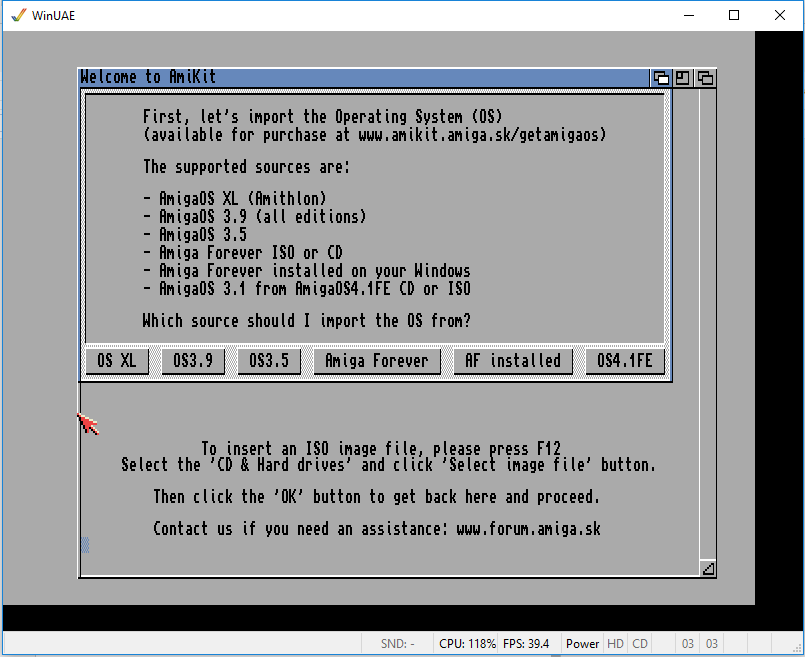

As I have a copy of Amiga Forever already installed so I'll just select "AF Installed" and take it from there and it proceeds to import system files, which takes a matter of seconds, then asks me to reboot.


Now I am taken to the very familiar Screenmode Prefs screen and I'll select a mode that is slightly lower than my laptops native resolution of 1366x768 so I'll select 1280x720.


Now apparently my AmiKit X installation is complete and I have to press "Enter" and get ready to be amazed.


Well I am amazed, after playing with it for a while I realise I am willing to go full screen with this so I just press F12 which opens up the WinUAE properties allowing me to select AmiKit-fullscreen.


And the process of having a fully functional AmigaOS laptop is complete.

In my next instalment I will be going to the next level.

Michael Holmes

Sunday, 13 November 2016

AMIGA LAPTOP E.M.M.A. PART 3

Amiga Laptop E.M.M.A. Part 3
Installing AmigaoS4.1
I don't really need to cover much about this as it has been documented many times under emulation and on native hardware so I will just comment on my experience setting up and the overall experience.

I will say I had a little problem when installing as the default window when installing was larger than my 14" Windows laptop resolution could cope with, I managed to get round this by installing Amiga Forever and then Installing AmigaOS4.1 on a laptop with a larger screen resolution.

Once OS4.1 was installed on my 15.6" laptop I could set the Workbench screenmode to one which would fit the 14" laptop which is 1366 x 768. Once the screenmode setting and the virtual HD and config file are saved they can then be copied to the new laptop and then when Amiga Forever is run and this config file and virtual HD are loaded then E.M.M.A. is up and running.

I am now able to run E.M.M.A. at virtually full screen, I have to take into account the taskbar of a Windows machine and also the titlebar on the Amiga Forever window and I get to run it at 1366 x 720 which is pretty good going.

I have a few issues that need to be addressed but as this is more time spent using Amiga Forever than I have ever done before I'm sure I'll get these sorted. There are also issues with the hardware choice but it's too late for that, for a start a 1.6ghz laptop is slow but usable, faster would be better.

I need to look into adding the PCs drives or directories, I know this is possible but it will take some investigation..

If there is one thing I have learnt from this process is that Amiga Forever is a very powerful piece of software that enables non Amiga PPC owning people to be able to get the experience without forking out for new hardware.

I can honestly say that without Amiga Forever I would not have been able to set up E.M.M.A.

Pricing
To get E.M.M.A. running it has cost me approx. £250.00, that includes the hardware, Amiga Forever and AmigaOS4.1 Classic, If I had spent another £100.00 on the laptop, this would have given me a 2.48ghz processor and therefore a smoother experience that is still only £350.00 which to me seems a very reasonable price to pay for an Amiga laptop.

Here's a simple question, would you buy E.M.M.A. for £350.00 if sold as a complete package?

I have enjoyed getting it to the stage I'm at and will continue to refine E.M.M.A. possibly try on a faster processor, use the laptops HD, possible larger screen modes and it would be nice to be able to boot straight into OS4.1 and not need to deal with Windows.

The End, or is it...

Michael Holmes